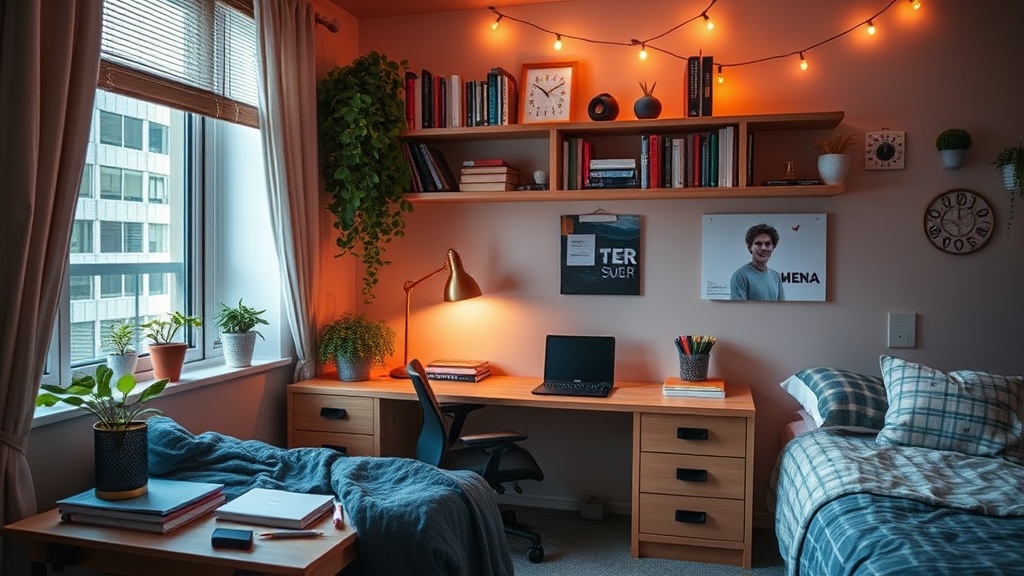
How to Create a Productive Study Space in Your Dorm Room

What This Post Covers (And Why Your Study Space Actually Matters)
This guide breaks down everything needed to transform a cramped dorm room into a focused, comfortable study environment. You'll learn how to arrange furniture for maximum concentration, choose lighting that won't strain eyes during late-night cram sessions, organize supplies so everything's within arm's reach, and create mental boundaries that help the brain switch into "work mode" — even when the bed is three feet away.
The reason this matters? Grades. Sleep. Sanity. A well-designed study space reduces procrastination, cuts down on distractions, and makes hitting the books less of a chore. Research from the American Psychological Association consistently shows that environmental factors — lighting, noise levels, ergonomic setup — directly impact cognitive performance and retention. In a dorm room where every square foot pulls triple duty (sleeping, socializing, studying), being intentional about the workspace isn't just nice to have — it's a survival skill.
How Do You Set Up a Study Space in a Small Dorm Room?
Start with the desk against a wall facing away from the door — this minimizes visual interruptions from hallway traffic. If the room layout allows, position the desk perpendicular to the bed rather than facing it. (Out of sight, out of mind — literally.) The goal is creating physical and psychological distance between rest and work zones.
Most dorm desks are 24 by 48 inches — not exactly sprawling. Here's the thing: vertical space is the secret weapon. A Halter Steel Mesh Monitor Stand lifts the laptop or monitor to eye level (saving necks from that dreaded "tech hunch") while creating storage underneath for notebooks, calculators, or that emergency stash of protein bars. Add a SimpleHouseware Mesh Desk Organizer — it's under $25 on Amazon and corrals pens, sticky notes, and chargers in one compact footprint.
Cable management isn't just aesthetics. A BlueLounge CableBox hides power strips and that rat's nest of cords, reducing visual clutter that subconsciously stresses the brain. For wall mounting without losing the damage deposit, Command Picture Hanging Strips support up to 16 pounds — perfect for whiteboards, calendars, or a small shelf. Speaking of whiteboards, the Quartet Glass Dry-Erase Desktop Computer Pad fits between keyboard and monitor, giving a scratch space for quick calculations or daily to-do lists.
What Lighting Is Best for Studying in a Dorm?
Layered lighting beats a single overhead bulb every time. Dorm room fluorescents are harsh, flicker-prone, and scientifically proven to cause eye fatigue and headaches during long study sessions. The fix? Combine ambient, task, and accent lighting for a setup that adjusts to the time of day and type of work.
For the desk, the BenQ e-Reading LED Desk Lamp ($89) adjusts color temperature from warm white (3000K) for relaxed reading to cool daylight (5700K) for focused analytical work. Its built-in ambient light sensor auto-adjusts brightness based on room conditions — one less thing to think about. Worth noting: cooler light temperatures boost alertness and concentration, while warmer tones signal the brain to wind down. (Save the warm settings for after exams.)
Behind the monitor, LED bias lighting — the MediaLight Mk2 is the gold standard — reduces eye strain by balancing the brightness difference between screen and wall. It's a breakthrough for anyone pulling all-nighters. For general room illumination, a TaoTronics LED Floor Lamp with adjustable brightness corners the market at around $50. The catch? Most dorms have strict rules about halogen lamps (fire hazard), so stick to LED options.
Finally, consider a small Himalayan salt lamp or the Philips Hue Go portable light for ambient warmth. While the health claims about salt lamps are questionable at best, the soft orange glow creates a calming atmosphere that makes marathon study sessions more bearable.
How Can I Minimize Distractions While Studying in My Dorm?
Noise-canceling headphones are non-negotiable. The Sony WH-1000XM5 ($348) and Bose QuietComfort 45 ($329) dominate reviews, but budget-conscious students should check out the Anker Soundcore Life Q30 — around $80 with surprisingly effective ANC. Pair them with brown noise or instrumental focus playlists on Spotify (search "Deep Focus" or "Lo-Fi Beats") to mask hallway conversations and that one neighbor who practices guitar at midnight.
Digital distractions need physical barriers. The Phone Jail Lock Box with Timer (yes, it's real — $30 on Amazon) physically locks the smartphone away for set periods. Less drastic: keep the phone in a drawer across the room. The friction of standing up to check notifications cuts scrolling by roughly 70%. (Not a scientific stat — just observed reality.) For laptops, browser extensions like Cold Turkey or Freedom block social media and news sites during designated study hours.
Roommate dynamics matter too. Establish "focus hours" — say, 7 PM to 10 PM on weeknights — where headphones mean "don't interrupt unless urgent." A small whiteboard on the door with "Study Session — Back at 9" prevents well-meaning friends from derailing momentum. Here's the thing: most people respect boundaries if they're clearly communicated upfront.
What Supplies and Organization Systems Actually Work?
The best organization system is the one that gets used. Fancy file cabinets and elaborate color-coding schemes often become forgotten clutter. Instead, optimize for frictionless access to frequently used items and out-of-sight storage for everything else.
| Item | Purpose | Budget Pick | Upgrade Option |
|---|---|---|---|
| Desk Organizer | Daily supplies (pens, sticky notes, clips) | SimpleHouseware Mesh ($18) | Yamazaki Tower ($45) |
| File Storage | Handouts, syllabi, returned assignments | Pendaflex File Crate ($12) | IRIS Desktop File Box ($28) |
| Drawer Dividers | Separating supplies in shallow dorm drawers | DIY cardboard (free) | Bamboo Adjustable Dividers ($22) |
| External Storage | Backing up essays and projects | SanDisk Ultra Flair 128GB ($15) | Samsung T7 Portable SSD 1TB ($90) |
| Timer | Pomodoro technique, focus blocks | Smartphone app (free) | Time Timer Original ($25) |
That said, don't over-organize before knowing actual habits. Start minimal — pen cup, one notebook, laptop — and add systems as pain points emerge. The Poppin Pen Cup ($8) is perfectly sized and doesn't tip over. For note-taking, the Rocketbook Fusion ($37) lets students write by hand (better retention than typing) then digitize pages to Google Drive or Dropbox using the app — no scanner needed.
Textbooks stay accessible but not dominant on a small IRIS USA Desktop Shelf — two tiers that sit on the desk surface, creating storage without drilling into dorm furniture. Under-bed storage bins (the Sterilite ClearView series) hold off-season clothes, extra supplies, and that textbook from last semester you're definitely going to resell. (You won't. But the optimism is nice.)
How Do You Create Mental Separation Between Study and Sleep Spaces?
The bed is for sleeping. The desk is for working. When those zones overlap in 150 square feet, the brain gets confused — leading to "study guilt" when trying to sleep and sleepiness when trying to study. Creating clear mental boundaries matters as much as physical organization.
Develop rituals that signal mode switches. A specific scented candle or P.F. Candle Co. Teakwood & Tobacco room spray can become the "study scent" — light it when sitting down to work, and eventually the brain associates that smell with focus mode. (Obviously, check dorm fire regulations first — many ban candles but allow diffusers. The Vitruvi Stone Diffuser in "Stay" or "Focus" key oil blends achieves the same effect.)
Change clothes. Seriously. Even swapping pajama pants for jeans signals the brain that it's work time. Some students swear by "desk shoes" — cheap slippers worn only while studying — creating a physical cue that it's time to concentrate. The visual barrier of a Room Divider Privacy Screen (foldable, around $60) physically separates sleeping and studying zones in studio-style dorms.
When concentration absolutely cannot happen in the room, know the backup spots. The University of Michigan Shapiro Undergraduate Library (or your campus equivalent) likely has silent floors, reservable study rooms, and extended hours during finals. Coffee shops within a 10-minute walk — Starbucks for reliable WiFi, or local favorites like Comet Coffee in Ann Arbor — provide ambient noise that actually boosts creativity for some learners. Have a ranked list: Room → Library → Coffee Shop → Friend's Apartment. Options reduce anxiety.
Comfort Without Sleepiness: Finding the Balance
Here's the thing about ergonomic comfort: it keeps bodies healthy but shouldn't put brains to sleep. A Purple Seat Cushion ($39) transforms those torturous wooden dorm chairs without making them nap-worthy. The Lumbar Support Pillow from LoveHome ($25) straps onto any chair back, promoting proper posture during marathon study sessions.
Temperature matters more than most people realize. Research published by Cornell University found that office workers make 44% more errors and accomplish less when temperatures drop below 68°F. Most dorms have unpredictable heating — a De'Longhi Oil-Filled Radiator Space Heater ($80) provides consistent warmth without the drying effects of forced-air units. (Again, check dorm policies — some ban space heaters entirely. In that case, layers and a Brooklinen Throw Blanket for the legs keep circulation flowing without cozying up too much.)
Keep water within reach. Dehydration causes headaches and cognitive decline — a Hydro Flask 32 oz Wide Mouth with straw lid sits on every productive student's desk. Snacks should be brain fuel, not sugar crashes: almonds, dark chocolate, rice cakes with peanut butter. The S'well Eats 2-in-1 Nesting Bowl keeps yogurt and granola or hummus and veggies fresh during long library sessions.
Maintaining the System
Spend ten minutes every Sunday resetting the space. Clear the desk surface, file loose papers, wipe down the keyboard with Whoosh! Screen Shine, and restock supplies. This isn't deep cleaning — it's maintenance that prevents chaos from accumulating. A weekly reset also provides a natural moment to review the upcoming week's assignments and deadlines.
Reassess every semester. What worked during freshman orientation might feel wrong by junior year. Maybe the desk needs to move closer to the window for natural light, or the chair upgrade finally becomes necessary after that 300-level economics class. Spaces evolve as study habits and course loads change. The goal isn't perfection — it's creating an environment where focus comes easier, distractions fade into the background, and sitting down to study feels less like a battle and more like a routine.
College is hard enough without fighting the room too. A thoughtful study space — organized, well-lit, comfortable, and separated from sleep zones — removes friction from the work that really matters. The investment pays off in better grades, less stress, and the rare dorm room experience of actually wanting to sit down and learn.
Steps
- 1
Choose and Optimize Your Desk Location
- 2
Organize Your Supplies and Minimize Clutter
- 3
Set Up Proper Lighting and Reduce Distractions